
Dollar General Penny List (Updated Weekly With UPCs)
✔️ Updated 02/09/2026
🔎 Live Dollar General Penny List + UPCs
📱 Scan in the DG App Before You Go

Did you know you can score Dollar General deals for just $0.01 thanks to the Dollar General Penny List? This special list includes specific items that ring up for just one cent at checkout — if you’re lucky enough to find them still on the shelves. The Penny List usually updates each week, and we post the penny list BEFORE ANYONE ELSE, normally on a Thursday afternoon–Friday morning, so you can head out Tuesday morning ready to hunt. Make sure to bookmark this page so you never miss a new round of penny finds.
You don’t need coupons for these deals, but you do need to shop in store, since penny items are unadvertised and only discovered through scanning and searching. Alongside the weekly penny list, Dollar General also rotates new clearance items that get deeper markdowns each week until they eventually hit that magical $0.01 price.
If you’re ready to level up from regular couponing to the thrill of penny shopping, you’re in the right place. We’ll walk you through where penny items tend to hide, how to spot them, how to verify prices in the DG app, and even tips on what to say at the register. Once you learn the ropes, penny shopping becomes the ultimate treasure hunt — and the savings are unbeatable. Make sure also to follow us on Facebook HERE at Crazy For Couponing.
What Is the Dollar General Penny List?
The Dollar General penny list is a list of discontinued or clearance items that ring up for $0.01 when scanned in the Dollar General app. These items are supposed to be pulled from shelves, but some are missed and can still be purchased for a penny.
These penny items aren’t part of a regular sale — they’re actually markdown “mistakes.” Dollar General drops certain products down to $0.01 in their system so store employees know it’s time to pull them from the sales floor.
But sometimes staff miss a few items, and those products stay out on the shelves. That’s where penny shoppers score big, grabbing those overlooked items for just a penny at checkout.
Most of the time, these items have already gone through multiple markdowns — often more than 90% off — and Dollar General is just trying to clear out the remaining inventory.
Want a heads-up on what might drop to a penny soon? Keep an eye on items currently marked at 90% off. Those deals may hang around for a week — or even a few weeks — before finally dropping to just $0.01.
The biggest thing to remember when penny shopping is to pay close attention to the size, flavor, count, and variety of each item. Everything must match exactly with what’s listed on the current Penny List in order for it to ring up for $0.01 at the register.
Quick breakdown of how Dollar General penny shopping works:
| Topic | What to Know |
|---|---|
| Penny Price | Items must ring up for $0.01 in the DG app |
| Where to Check | Scan using the Dollar General app scanner |
| Item Matching | Size, scent, variety, and UPC must match exactly |
| Availability | Items may be pulled at any time |
| Best Tip | Scan everything before checkout |
How Dollar General Penny Shopping Works
Dollar General penny items are products that have been marked down through the store’s system until they hit $0.01. These items are typically discontinued, seasonal, or part of a reset and are supposed to be pulled from the sales floor when they penny out.
However, some items get missed and stay on the shelves. When that happens, penny shoppers can find them — but only if the exact item matches what is on the current penny list (size, scent, count, variety, and UPC).
Here’s what to expect when penny shopping:
- YMMV (Your mileage may vary): Prices and inventory can vary by store and location.
- Items may disappear quickly: Stores may pull penny items once they realize they’re still on the shelves.
- Not every store is behind: Some stores pull everything right away, so you may find nothing that day.
- Resets can change prices: If a product is restocked or reset, the system can bump the price back up.
The best way to avoid surprises is to scan every item in the DG app before checkout and double-check that it matches your current penny list exactly.
Quick overview of how Dollar General penny shopping works:
| Topic | What to Know |
|---|---|
| Penny Price | Items must ring up for $0.00 in the DG app |
| Where to Check | Scan using the Dollar General app scanner |
| Item Matching | Size, scent, variety, and UPC must match exactly |
| Availability | Items may be pulled at any time |
| Best Tip | Scan everything before checkout |
Things to Know About the Dollar General Penny List
1. Dollar General employees are supposed to sell you penny items.
The Dollar General Employee Handbook states that if an item scans for $0.01, employees are expected to sell it to you. That said, some stores may still refuse to complete the sale, even though the policy is on your side. If a cashier hesitates, you can politely mention the policy. If they still won’t sell it, kindly ask them to remove the penny item from your transaction and move on.
2. Grab every Dollar General penny item you want before you head to the register.
You usually get one chance to buy the quantity you want. If you only take one penny item to the checkout, it can alert the cashier to go pull the rest from the shelf — and they may not allow you to buy any more. When you find penny items, add everything you want to your cart before you check out.
3. Don’t ask employees to help you find penny items.
Avoid mentioning penny items to store employees at all. Remember, these are products that should have already been pulled from the sales floor. Asking about them just reminds staff to remove them. Don’t ask employees where penny items are, and definitely don’t call corporate over a penny item situation. Quiet hunting is the best strategy.
4. Watch out for “Penny Resets.”
Items that drop to a penny will stay at that price until there’s a “Penny Reset.” A reset happens when Dollar General restocks that same product, which causes the system to bump the price back up to full. If last season’s items are still on the shelf when the new season’s stock arrives, those older items can suddenly go back to full price — meaning they’re no longer $0.01 deals.
5. Use the Dollar General App to Check Penny Prices
You can use the Dollar General mobile app (iOS / Android) to scan items and check their prices before you ever head to the register. Just make sure your app is updated to the latest version, especially on Tuesdays when new penny markdowns go live.
Also be sure to set your store location inside the app to the exact Dollar General you’re shopping at. This ensures you’re seeing the correct, most up-to-date pricing for that specific store.
And just to clear it up — there is no separate Dollar General Penny List app. The regular DG app is what you’ll use to check for those $0.01 deals.
How to Scan Penny Items Using the DG App
Always scan items in the Dollar General app before checkout. Penny items must ring up for $0.01 in the app — shelf tags and clearance stickers do not guarantee a penny price.
Scan Using the DG App Scanner
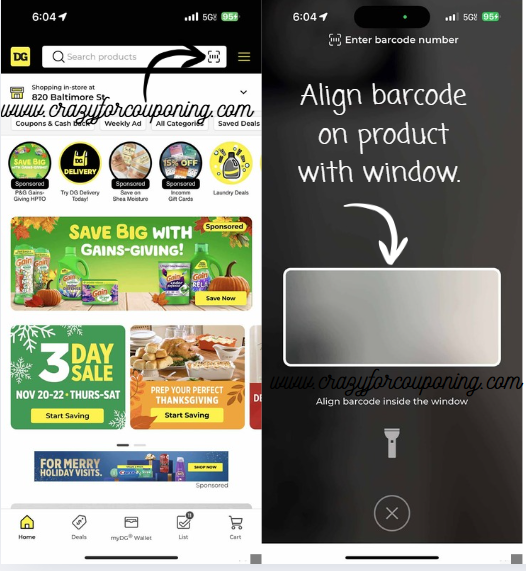
- Open the Dollar General app.
- Select the correct store.
- Tap the barcode scanner icon.
- Scan the item.
- If it shows $0.01, it’s a penny item.
Manually Enter a UPC
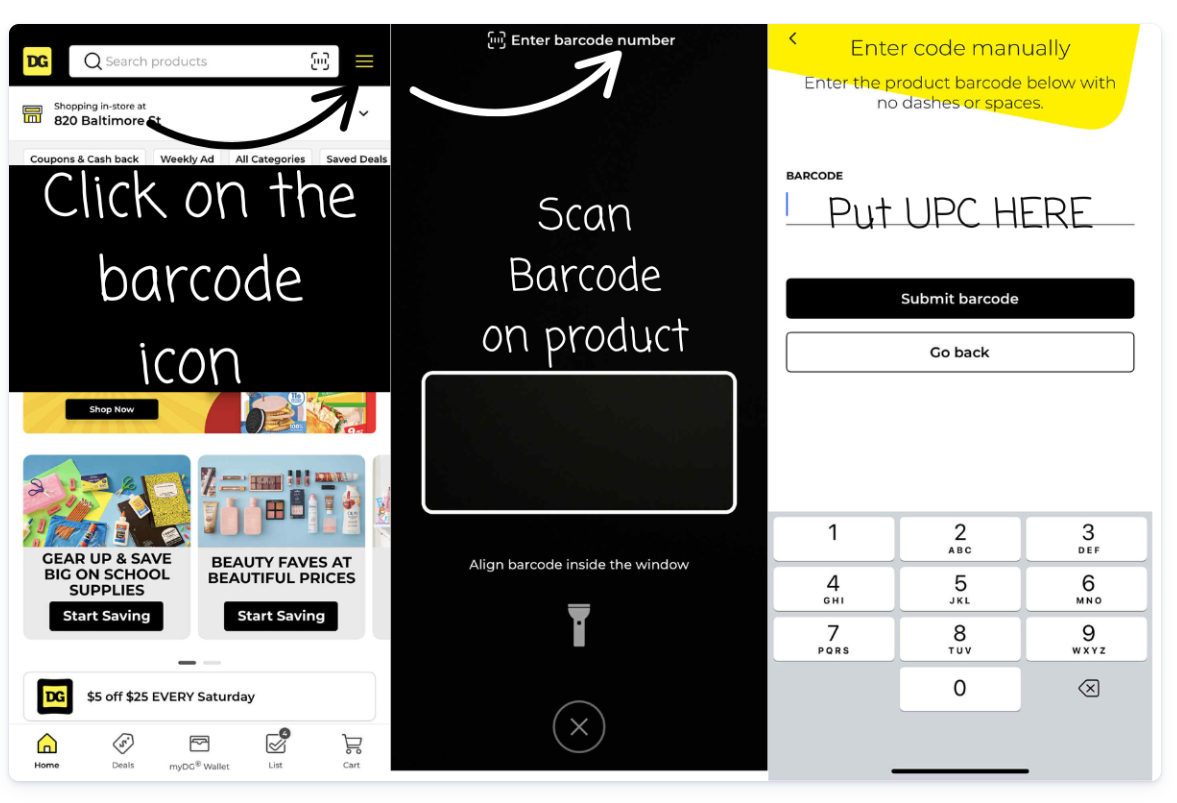
- Tap the scanner icon.
- Select Enter barcode number.
- Type the UPC (no spaces).
- Tap Submit barcode.
- Confirm the price shown.
Reminder: Prices can vary by store, and penny items may be pulled at any time — always scan before paying.
6. Check the Dollar General Penny List Every Monday
Check back here every Monday afternoon for the newest Dollar General Penny List. We usually receive the list early, but additional items can pop up later in the day, so be sure to revisit and refresh for updates.
Current Dollar General Penny List (Updated)
Below is the current Dollar General Penny List, featuring items that are ringing up for $0.01 when scanned in the Dollar General app. This list is updated frequently as new penny items are discovered and confirmed.
Last updated: January 26, 2026
Important: Always scan items in the DG app before checkout. Shelf tags, clearance stickers, and signage do not guarantee a penny price.
Penny items must match the list exactly, including:
- UPC number
- Size or count
- Scent, flavor, or variety
- Packaging style
If an item does not scan for $0.01 in the app, it is not a penny item at that store.
Current Dollar General Penny List
- February 10, 2026 – No New Pennies
Past Dollar General Penny Lists
Below are previous Dollar General penny lists that have dropped in the past. While many penny items are quickly pulled from shelves, some products may still be found depending on store resets and timing.
Keep in mind:
- Past penny items may no longer be available.
- Some items may reset back to full price.
- Older penny items can occasionally reappear at select stores.
- Always scan items in the DG app before checkout.
If you’re penny shopping after the original drop date, it’s still worth scanning — especially if your store is behind on pulling items.
Recent Penny List Dates:
- February 10, 2026 – No New Pennies
-
February 03, 2026
- Pricing – MOS
- Christmas Apparel, Socks, Home, Seasonal, Stationery, & Party
- Christmas Candy
- Dolly Christmas Apparel & Tier Table
- Gift Card Accessories
- Holiday Air Care, Baking, Picnic
- Select Bath/Beauty Gift Sets
- Huge Toy Penny List
- View visuals and SKUs here – Dollar General Penny List & Clearance Updates (02/03/2026)
- Pricing – MOS
-
January 27, 2026
- PRP Item List
- Skor Candy Bar Standard Fr End Ck (2L)
UPC: 34000003709 - Kool-Aid Drink Sticks Tropical 6ct
UPC: 43000090282 - Cadbury Dairy Milk XL Bar 3.5oz
UPC: 34000040254 - Mr. Goodbar Candy Bar XL Bar 4.4oz
UPC: 34000173150 - Jolly Rancher Ropes LDB Blue Rasp Cherry 10.4oz
UPC: 10700557261 - Jolly Rancher Ropes LDB Watermelon Apple 10.4oz
UPC: 010700557254 - General Mills Monsters Boo Berry Cereal 9.6oz
UPC: 16000275812 - General Mills Monsters Count Chocula Cereal 10.4oz
UPC: 16000275836
- Skor Candy Bar Standard Fr End Ck (2L)
- Food & Nutritional MOS Item List
- DG Health A1611 Pain Relief Menstrual Gel Tabs 24ct
UPC: 370692000924 - Alka-Seltzer Energy Boost Effervescent Tablets 10ct
UPC: 16500600350 - Prilosec OTC Heartburn Relief Wildberry 14ct
UPC: 37000808367 - Natrol Melatonin 3mg Tablets 60ct
UPC: 47469005108 - Qunol Sleep Support Capsules 14ct
UPC: 898440001707 - Qunol Turmeric 500mg Capsules 21ct
UPC: 850184008671 - Rexall A0281 Fish Oil 1000mg Natural 90ct
UPC: 301220293532 - Rexall A0964 Melatonin Quick Dissolve 10mg 30ct
UPC: 301220657600 - Rx Naturalist A1367 Turmeric Capsules 120ct
UPC: 30768559519 - Rx Naturalist A1538 Vitamin B-12 Sublingual 5000mcg 60ct
UPC: 030768321161
- DG Health A1611 Pain Relief Menstrual Gel Tabs 24ct
- View visuals and SKUs here – Dollar General Penny List & Clearance Updates (01/27/2026)
- PRP Item List
- January 20 – New Years Eve
- Select Home SKUs
- Select Stationary and Party SKUs
- View visuals and SKUs here – Dollar General Penny List & Clearance Updates (01/20/2026)
Dollar General Penny Shopping Tips
Penny shopping can be a lot of fun — but it works best when you stay quiet, scan everything, and double-check that the item matches the penny list exactly. Use these tips to avoid surprises at checkout.
1. Scan everything before you check out.
The DG app is the only reliable way to confirm penny pricing. Shelf tags, clearance stickers, and signs do not guarantee a penny price. If it does not scan for $0.01 in the app, it is not a penny item at that store.
2. Match the item details exactly.
With penny items, small differences matter. Make sure the size, count, scent/flavor, variety, and packaging match what’s listed — and always confirm the UPC when one is provided.
3. Don’t ask employees to help you find penny items.
Penny items are products that should have already been pulled from the sales floor. Mentioning them can cause staff to immediately remove them. Your best strategy is to quietly scan items while you shop.
4. Put everything you want in your cart before going to the register.
If you find penny items, grab what you want first, then check out. Bringing one item up early can alert staff to pull the remaining items from the shelves.
5. Watch for “penny resets.”
Some items stay at $0.01 until a reset happens. When Dollar General restocks that same product, the system can bump the price back up to full. This is why scanning before checkout matters every time.
6. Be respectful and expect YMMV.
Every store handles penny items differently, and inventory varies by location. Stay kind, don’t argue at checkout, and if a store won’t sell a penny item, ask for it to be removed and move on.
Want to increase your chances of finding penny items? Focus on scanning items that are already marked 70%–90% off — those are often the products that drop to a penny next.